

I made Azul, because we deserve better than Rojo
I now mostly make my Roblox games using a tool I built myself, called Azul.
It's a sync tool between your PC and Roblox Studio. It basically allows you to edit your game files using your favorite code editor, and have the changes reflected in Studio in real-time.
But... Why does Azul exist? Why not just use Rojo, the most popular tool? Well, in this article I want to explain why I made Azul, and why I think it's a better tool than Rojo.
A bit of history
Today, Roblox Studio's editor is decent. Roblox has had many years to polish and refine the experience, and what they have now is a very solid code editor that supports most features you'd expect from a modern IDE, and it's extensible with some amazing plugins that can speed up your workflow a lot.
In 2017, things were a lot different. Roblox was finally starting to become a serious game development platform, and many developers were starting to treat it as such. However, Roblox Studio was still very much a "game maker" tool. The built-in code editor was very basic, and it lacked many features that more advanced developers were used to in other code editors.
These frustrations led a smart few to a novel idea:
"What if we could ditch the built-in code editor, and edit our game files with whatever we wanted?"
This is how many early "sync tools" were born: RbxSync, RbxRefresh, CodeSync...
These tools worked by watching your local files for changes, and then sending those changes to Roblox Studio. This allowed developers to use their favorite code editors, and have the changes reflected in Studio in real-time.
However, a lot of these tools were very rough around the edges. They were often buggy, and they didn't always work as expected.
This all changed with the release of LPGhatguy's Rojo. The creator had a very clear vision for what he wanted to achieve and, alongside a team of very talented contributors, he made it a reality. Rojo was a very polished tool that worked as expected, and it quickly became the de-facto sync tool for Roblox projects, developing into its own ecosystem of packages and plugins.
...But today isn't 2017. Roblox Studio, developers and even Rojo itself have changed.
How Rojo works
In principle, Rojo is a very simple tool.
It watches your local files for changes, and then it updates the state of your Roblox Studio to match.
All of this works around a "project file". This file tells Rojo how to map your local files to the game's hierarchy. For example, if you have a folder called 📂 server, you can tell Rojo to map all scripts in that folder to ServerScriptService.
In an ideal world, this would be perfect. You have a simple, clean architecture (server/, client/, shared/) where your filesystem is the source of truth, and Roblox Studio is just a dumb client that reflects the state of your files.
What's wrong with Rojo?
Fully Managed Rojo
If you ever used Roblox Studio, you might have noticed that it has some glaring differences from traditional files and folders. Objects like Parts, Models, Meshes... They aren't files, they're objects in a hierarchy. They have properties, and they can be nested inside each other.
So, how does Rojo handle this? It makes you manually write down the structure of your game in the project file. If you want to create a new Part, you have to edit the default.project.json, and then tell Rojo where to put it in the hierarchy:
1// Example: Adding a new Part called "CoolPart" to the Workspace
2"Workspace": {
3  "$className": "Workspace",
4  "CoolPart": {
5    "$className": "Part",
6    "$properties": {
7      "Anchored": true,
8      "Size": [4, 1, 4],
9      "Position": [0, 10, 0],
10      "Color": [1, 0, 0]
11    }
12  }
13}
If your model is more complex than the example above (it usually is), you can manually reference the .rbxm/.rbxmx model file:
1"Workspace": {
2      "Car": {
3          "$path": "src/Car.rbxm"
4      }
5    },
This is Fully Managed Rojo, and it's a very tedious and error-prone way of creating a Roblox game.
First, the model file itself is completely opaque.
- Want to make a small edit? Adjust the position of something? Better open another instance of Studio, make the change, and re-export the model.
Second, while Rojo's proposition of offline model management sounds interesting, it doesn't really work in practice. Roblox is fundamentally a live-service platform, both for the player and the developer. This comes with the implication that your assets (meshes, textures, sounds, etc.) must be stored on Roblox's servers at some point. This makes offline management of models very impractical.
- Does your super-cool Car model have a
SurfaceAppearancewith a roughness map, color map and normal map? Well, after you export the images, upload them to Roblox, don't forget to open the model in a new Studio instance and re-assign the image IDs to theSurfaceAppearance.
Partially Managed Rojo
The problems of Fully Managed Rojo are slightly alleviated if you choose to use something called "partially managed" Rojo. Essentially, you can tell Rojo to only "manage" or keep track of specific parts of your project, which means you can still manage some parts of your project in Studio, and only specific parts with Rojo.
For instance, in the previous example, you could tell Rojo to only manage ServerScriptService, StarterPlayerScripts, and ReplicatedStorage, and leave your super cool car model unmanaged.
However, this leaves you in an awkward middle-ground where your filesystem has a "blind spot" for anything that isn't managed. You give up the main appeal of Rojo - the ability to define your project structure in the filesystem - resulting in you managing your project in two places: the filesystem, and Studio.
This is a middle-ground many people choose to live in, but it can be a nightmare to manage.
Partially managed Rojo doesn't solve a problem I like to call "poisoned folders":
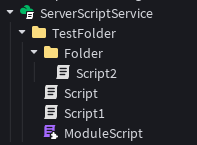 A "normal" folder with nothing but Folders and Scripts
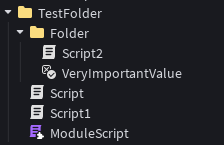 A "poisoned" folder; we introduced one BoolValue
If you want Rojo to properly manage the "poisoned" folder, you'll have to either add it to the project file, create a .model.json for the Folder, or move the BoolValue out of the folder altogether.
1// server/TestFolder/Folder/boolvalue.model.json
2{
3  "className": "BoolValue",
4  "properties": {
5    "Value": true
6  }
7}
This is a very silly example, but you can see how this can quickly become a nightmare to manage, especially with datatypes more complex than just a true/false value.
Some may argue that "poisoned" folders are a symptom of bad design. However, I would argue that's a very naive perspective. Roblox Studio is purposefully flexible and allows you to create any type of hierarchy you want. This is a very good thing, and it allows developers to be creative and make their games in the way that makes the most sense for them.
Existing projects?
Rojo is notoriously not the best tool for importing existing projects.
The only tool that allowed you to use existing projects with Rojo hasn't been maintained in 5 years. It's 6th anniversary is this May!
(Fun fact: My PR of rbxlx-to-rojo is one of the only ways to still use it!)
July Update:
The Rojo team have implemented
rojo syncback, which is their solution for converting existing games to Rojo projects. While I commend them for going to great lengths to make this work (apparently, it's been in the works for a long time), it's still a very tedious and error-prone process, not solving many of the issues discussed in this article.
The "sync" part
In reality, Rojo isn't really a "sync" tool, is it?
While Rojo likely started as a sync tool, it's evolved into what they call a "build tool", which means that its goal is to generate Roblox games from your filesystem. Rojo isn't trying to be a companion to Roblox Studio, it's trying to replace it.
This explains many of the design decisions that make Rojo a burden to use for people that don't want to replace Studio. We're just not the target audience, and that's fine!
The market for Rojo alternatives
Unsurprisingly, I'm not the first person to complain about Rojo.
In the past few years, there have been a few attempts at making Rojo alternatives. The problem, is that Rojo is a very hard act to follow. It's a very polished tool that works as expected, with a tight ecosystem and a large userbase. Any alternative would have to be significantly improve upon Rojo, work with the years of Rojo projects that are already out there, and not completely alienate everyone else.
Roblox Studio's Script Sync
Roblox's official "Script Sync" is a very recent addition to Roblox Studio, and it's a very good tool. It allows you to edit your scripts in your favorite code editor, and have those changes reflected in Studio in real-time.
The issue is that it's very barebones. It's just a simple mirroring tool which you mostly set up manually (by right clicking a Script or Folder). While this is a good start and it works, it lacks many features that Rojo has, such as Package Manager support, or the ability to import existing projects from your filesystem.
Argon
Argon is a very interesting tool because it feels like a spiritual successor to Rojo.
If Rojo is the "Classic" way to build, Argon is the "Updated" way. It's generally much friendlier and easier to use, especially since two-way syncing is a first-class feature.
But there's a catch. Despite all its polish, Argon is still fundamentally a build tool at its core. It still relies on the *.project.json manifest. It still requires you to map out your hierarchy in a configuration file if you want to do anything beyond the basics.
While Argon makes the "Rojo way" much faster and more pleasant through nice features and automations, it doesn't solve the core issue for developers who just want to sync.
Azul
So, seeing no other alternative, I decided to make my own tool, Azul! (pun on Rojo intended)
I wanted a tool that just worked, that didn't require me to change the way I worked, that worked with my existing projects, and that didn't require me to manage any project/meta files.
This is how Azul was born.
 The Azul logo
Initially, Azul was supposed to be a "sourcemap builder", a patch on top of Roblox's Script Sync that let you get autocomplete support for your local files in Studio. However, it grew into a full-blown sync tool.
It's one command to get started, and it doesn't disrupt the normal workflow of Roblox Studio. You can edit your game in Studio, and have those changes reflected in your files. You can also edit your files, and have those changes reflected in Studio.
What I changed
- Studio is the source of truth: Azul is very clear about the fact that Studio is the source of truth, and your filesystem is just a reflection of that.
- No more project files: It's just one command to start Azul, and it just works. No more writing JSON files, no more managing model files, no more worrying about the structure of your project.
- Support for existing projects: It's as easy as creating new projects, just run
azuland it will automatically sync your existing project to your filesystem. - No more "poisoned" folders: You can have any type of object in your folders, because state isn't managed in your filesystem. Have Scripts inside tools, inside models, inside anything!
- Confusing conventions: I always believed the
init.luauconvention was very obtuse, because your Script's name and location no longer corresponds to its location in Studio, so I got rid of it. I actually made a lengthier post about this topic, if it piques your interest: A case againstinit.luau
What I kept from Rojo
- Filesystem -> Studio: Azul offers the ability to import projects from your filesystem to Studio.
- Rojo Compatibility: Azul has a compatibility layer for existing Rojo projects, so it can import your favorite Rojo projects and libraries just fine.
- Package Manager support: You can use Wally, pesde or any other package manager to manage your dependencies, and it will sync them to Studio properly.
- Reproducible builds: Azul lets you generate reproducible builds of your game in a few commands, just like Rojo. This lets you easily share your project with others or source control it.
Closing thoughts
My goal with this project was to make something that I wanted to use, and I think I succeeded. Azul is the tool I use every day to make my games, and it has significantly improved my workflow. It's not perfect, and it still has some rough edges, but it's a tool that I enjoy using, and that's all that matters to me.
Rojo is not a bad tool, and I have a lot of respect for the work the Rojo team have done. However, I also believe that there is room for improvement, and I hope that Azul can be a step in that direction.
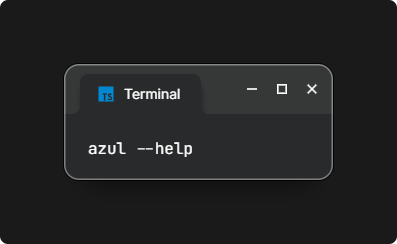
If you're interested in checking out Azul, you can find it on GitHub, and let me know what you think!